> ## Documentation Index
> Fetch the complete documentation index at: https://developer.nomba.com/llms.txt
> Use this file to discover all available pages before exploring further.
# Sandbox Testing
> Test your Nomba Checkout integration end-to-end in the sandbox environment
All sandbox API calls must use the base URL `https://sandbox.nomba.com` **and** your sandbox credentials. Mixing production credentials with the sandbox URL (or vice versa) will cause authentication errors. See [Environment](/docs/api-basics/environment) for details.
## Before you start
### Get your sandbox credentials
Log in to the [Nomba dashboard](https://dashboard.nomba.com), navigate to **API Keys**, and copy your **test** `clientId`, `clientSecret`, and `accountId`. These are generated alongside your production credentials and only work with `https://sandbox.nomba.com`.
### Generate a sandbox access token
Exchange your test credentials for an access token. The sandbox token is short-lived — if you get `401` errors mid-test, generate a new one.
```bash theme={null}
curl --request POST \
--url https://sandbox.nomba.com/v1/auth/token/issue \
--header 'Content-Type: application/json' \
--header 'accountId: ' \
--data '{
"grant_type": "client_credentials",
"client_id": "",
"client_secret": ""
}'
```
```json Response theme={null}
{
"code": "00",
"description": "Success",
"data": {
"access_token": "eyJhbGci...",
"refresh_token": "01h4gdx2...",
"expiresAt": "2026-01-01T12:00:00Z"
}
}
```
All sandbox checkout endpoints are under the `/sandbox/checkout/` path prefix, not `/v1/checkout/`. This is the key difference between sandbox and production.
***
## Card payment flow
### Step 1 — Create a checkout order
```bash theme={null}
curl --request POST \
--url https://sandbox.nomba.com/sandbox/checkout/order \
--header 'Authorization: Bearer ' \
--header 'Content-Type: application/json' \
--header 'accountId: ' \
--data '{
"order": {
"orderReference": "test-order-001",
"amount": "400000.00",
"currency": "NGN",
"customerEmail": "test@example.com",
"callbackUrl": "https://merchant.com/callback"
}
}'
```
```json Response theme={null}
{
"code": "00",
"description": "Success",
"data": {
"checkoutLink": "https://checkout.nomba.com/sandbox/",
"orderReference": "test-order-001"
}
}
```
If you omit `orderReference`, Nomba generates one in the format `{accountId_prefix}_{timestamp}` and returns it in the response. Use that value for all subsequent calls.
The sandbox checkout link has the format `https://checkout.nomba.com/sandbox/{encryptedRef}` — note the `/sandbox/` segment, which distinguishes it from production links.
Orders and their data are stored for **48 hours** before expiring.
***
### Step 2 — Submit card details
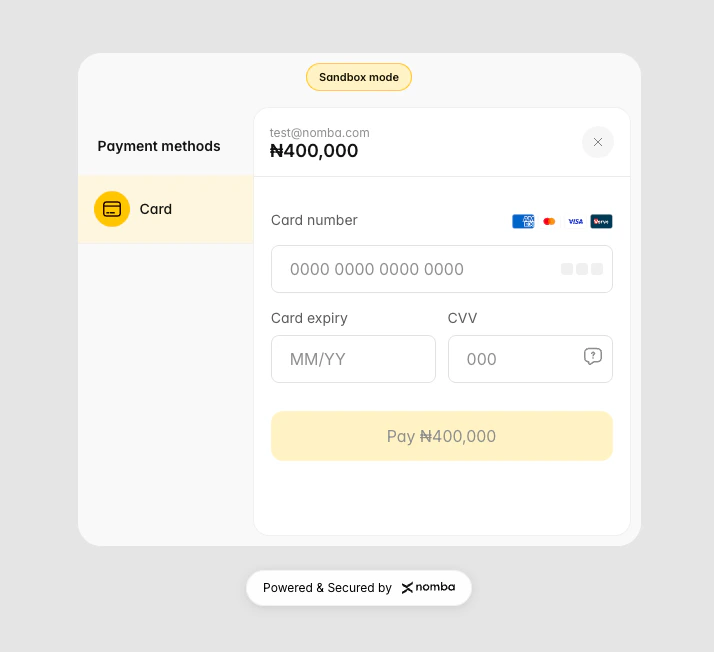
Submit the test card details to the checkout. The response depends entirely on which card number you use.
 ### Test card numbers
Use one of these three cards to simulate different payment outcomes:
| Card Number | Network | Outcome | Next step |
| ------------------ | ---------- | ----------------------------------------- | -------------------------------- |
| `5434621074252808` | Mastercard | OTP required (T0 response) | Submit OTP to complete |
| `4000000000002503` | Visa | 3DS authentication required (S0 response) | Handle 3DS redirect |
| `5484497218317651` | Mastercard | Declined — "do not honor" | No further steps; payment failed |
Card expiry, CVV, and PIN values are not validated in the sandbox — any values are accepted. Only the card number determines the outcome.
### Test card numbers
Use one of these three cards to simulate different payment outcomes:
| Card Number | Network | Outcome | Next step |
| ------------------ | ---------- | ----------------------------------------- | -------------------------------- |
| `5434621074252808` | Mastercard | OTP required (T0 response) | Submit OTP to complete |
| `4000000000002503` | Visa | 3DS authentication required (S0 response) | Handle 3DS redirect |
| `5484497218317651` | Mastercard | Declined — "do not honor" | No further steps; payment failed |
Card expiry, CVV, and PIN values are not validated in the sandbox — any values are accepted. Only the card number determines the outcome.
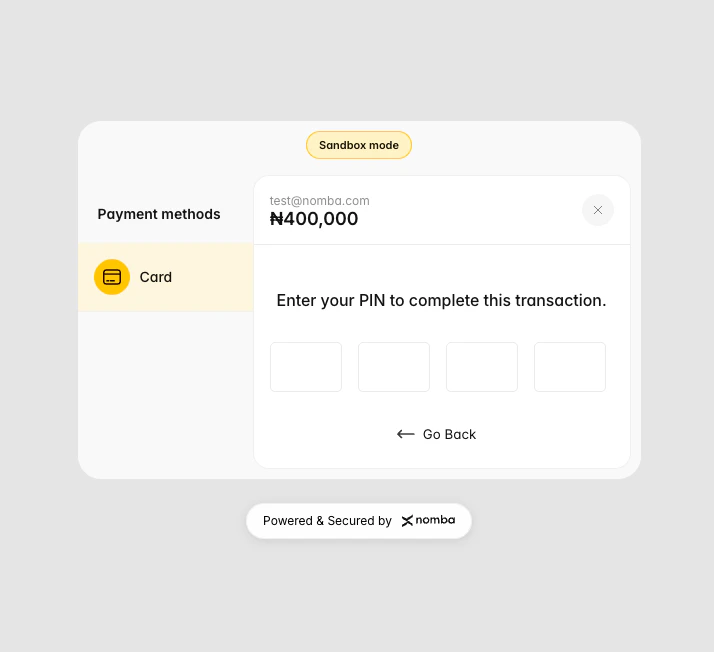
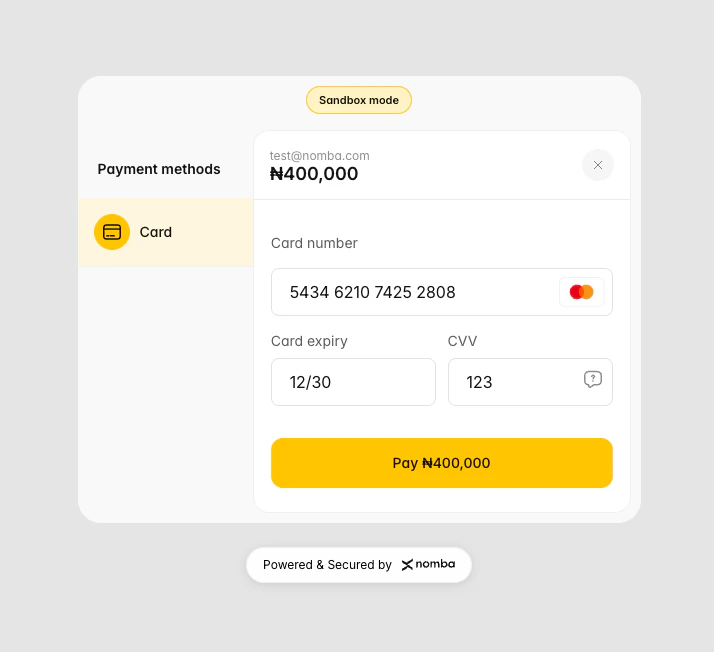 ### Step 3 - Submit Card Pin (if required)
Enter `1234` as the card pin
### Step 3 - Submit Card Pin (if required)
Enter `1234` as the card pin
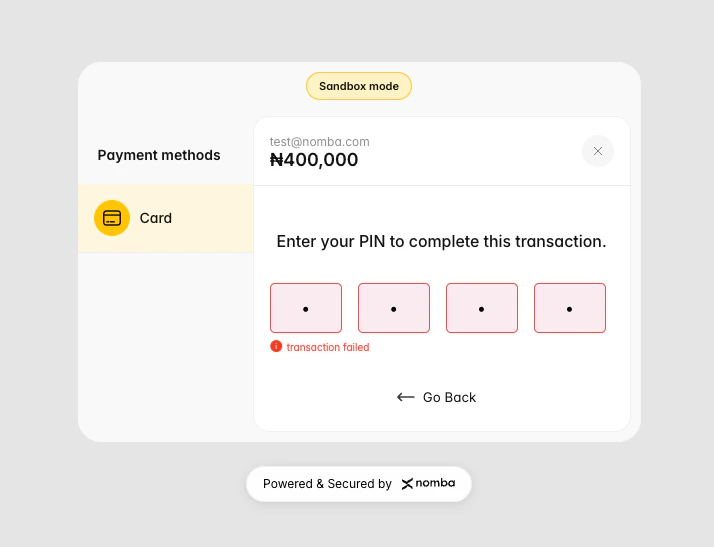
 **Declined card (5484497218317651) response:**
 ***
### Step 4 — Submit OTP
After submitting the successful Mastercard (`5434621074252808`), the customer is prompted for an OTP. Submit one of the following test values to control the outcome:
| OTP | Outcome | Message |
| ------ | ----------- | ---------------------------------------------------- |
| `9999` | Approved | "Approved by Financial Institution" |
| `1234` | Timeout | "Your payment has exceeded the time required to pay" |
| `5464` | Invalid OTP | "Invalid OTP" |
***
### Step 4 — Submit OTP
After submitting the successful Mastercard (`5434621074252808`), the customer is prompted for an OTP. Submit one of the following test values to control the outcome:
| OTP | Outcome | Message |
| ------ | ----------- | ---------------------------------------------------- |
| `9999` | Approved | "Approved by Financial Institution" |
| `1234` | Timeout | "Your payment has exceeded the time required to pay" |
| `5464` | Invalid OTP | "Invalid OTP" |
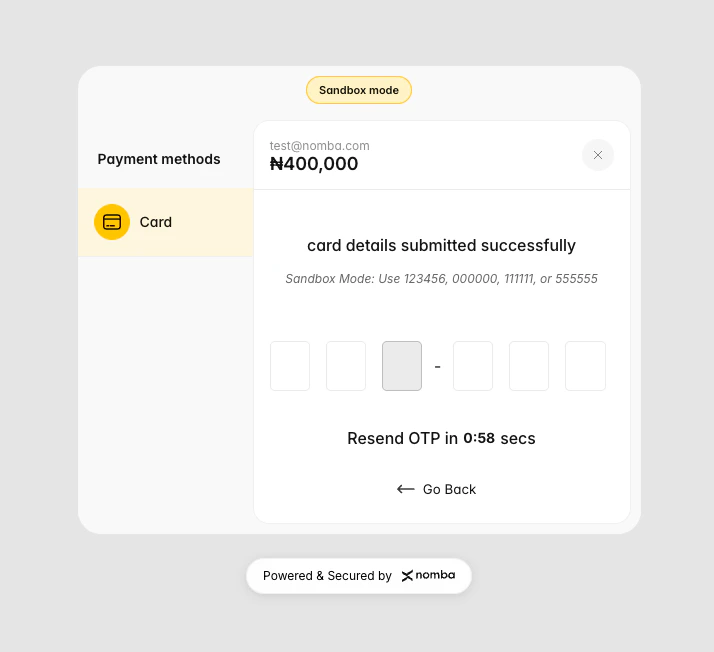 **Successful card (5434621074252808) response:**
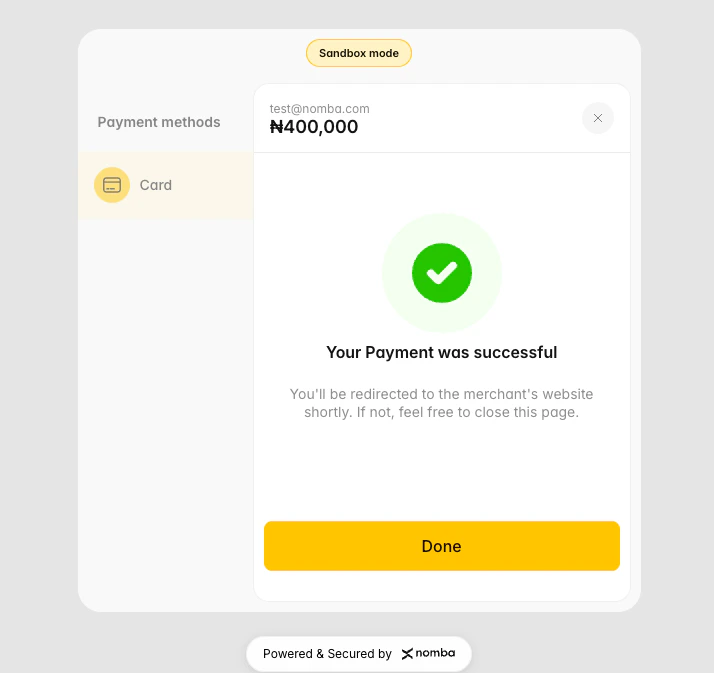 On a successful OTP submission, Nomba **immediately fires a webhook** to your configured `callbackUrl` with a `payment_success` event. See [Webhook payload](#webhook-payload) below.
***
### Step 4 — Verify the transaction
Use the sandbox-specific fetch endpoint to confirm the transaction result:
```bash theme={null}
curl --request GET \
--url 'https://sandbox.nomba.com/sandbox/checkout/transaction?idType=orderReference&id=test-order-001' \
--header 'Authorization: Bearer ' \
--header 'accountId: '
```
```json Response theme={null}
{
"code": "00",
"description": "Success",
"data": {
"success": true,
"message": "PAYMENT SUCCESSFUL",
"order": {
"orderId": "a1b2c3d4-e5f6-47a8-xxxx-xxxxxxxxxxxx",
"orderReference": "test-order-001",
"amount": "4000.00",
"currency": "NGN",
"customerEmail": "test@example.com"
},
"transactionDetails": {
"transactionDate": "2026-03-31T10:00:00Z",
"paymentReference": "WEB-ONLINE_C-abc123-550e4c3a-...",
"statusCode": "PAYMENT SUCCESSFUL",
"tokenizedCardPayment": "false"
},
"cardDetails": {
"cardPan": "543462 **** **** 2808",
"cardType": "MASTERCARD",
"cardCurrency": "NGN"
}
}
}
```
You can query by `idType=orderReference` or `idType=orderId`. The `id` value changes accordingly.
The sandbox transaction fetch endpoint is `GET /sandbox/checkout/transaction` — not `GET /v1/checkout/transaction`, which is production-only. Transaction IDs in the sandbox follow the format `WEB-ONLINE_C-{first6charsOfAccountId}-{UUID}`.
***
## Webhook payload
The sandbox fires webhooks **synchronously** immediately after a successful transaction — either after OTP approval (card) or `confirm-transaction-receipt` (bank transfer). Webhooks include HMAC-SHA256 signature headers for verification.
**Signature headers:**
| Header | Description |
| --------------------------- | ------------------------------------ |
| `nomba-signature` | HMAC-SHA256 signature of the payload |
| `nomba-sig-value` | Raw signature value |
| `nomba-signature-algorithm` | Always `HmacSHA256` |
| `nomba-timestamp` | ISO 8601 UTC timestamp of the event |
**Sample card payment webhook payload:**
```json theme={null}
{
"event_type": "payment_success",
"requestId": "550e8400-e29b-41d4-a716-446655440000",
"data": {
"merchant": {
"userId": ""
},
"transaction": {
"fee": 0.28,
"type": "online_checkout",
"transactionId": "WEB-ONLINE_C-abc123-550e4c3a-0af4-4887-a089-xxxx",
"merchantTxRef": "txref-1743379200",
"transactionAmount": 4000.00,
"time": "2026-03-31T10:00:00Z"
},
"order": {
"amount": 4000.00,
"orderId": "a1b2c3d4-e5f6-47a8-xxxx-xxxxxxxxxxxx",
"accountId": "",
"customerEmail": "test@example.com",
"orderReference": "test-order-001",
"paymentMethod": "card_payment",
"currency": "NGN"
}
}
}
```
To receive webhooks during local development, use a tunnel tool (e.g. [ngrok](https://ngrok.com)) to expose your local server and set the public URL as your `callbackUrl` when creating the order.
***
## Refund testing
Refunds are available in the sandbox. Use `POST /sandbox/checkout/refund` with the `transactionId` from the fetch transaction response.
```bash theme={null}
curl --request POST \
--url https://sandbox.nomba.com/sandbox/checkout/refund \
--header 'Authorization: Bearer ' \
--header 'Content-Type: application/json' \
--header 'accountId: ' \
--data '{
"transactionId": "WEB-ONLINE_C-abc123-550e4c3a-...",
"amount": 4000.00
}'
```
To simulate a **failed refund**, use this specific `transactionId`:
```
WEB-ONLINE_C-97922-db88d4c3-a0af-4887-a089-b5d2e51b8f19
```
This always returns `code: "400"` regardless of the amount.
***
## Simulating error states
| What to test | How to trigger |
| --------------------------- | --------------------------------------------------------------------------- |
| Order not found | Use `orderReference: "1234567890"` — returns `404` on all endpoints |
| Card declined | Use card `5484497218317651` |
| OTP timeout | Submit OTP `1234` |
| Invalid OTP | Submit OTP `5464` |
| Failed refund | Use transactionId `WEB-ONLINE_C-97922-db88d4c3-a0af-4887-a089-b5d2e51b8f19` |
| Failed tokenized card fetch | Use `customerEmail: "test@test.com"` |
***
## Sandbox vs production — what's different
| Feature | Sandbox | Production |
| ---------------------- | ----------------------------------- | ------------------------------ |
| Base path for checkout | `/sandbox/checkout/` | `/v1/checkout/` |
| Create order | ✅ | ✅ |
| Card payment | ✅ Test cards only | ✅ Real cards |
| Bank transfer | ✅ Simulated | ✅ Real transfers |
| 3DS authentication | ✅ Simulated | ✅ Real |
| Webhooks | ✅ Fires synchronously | ✅ Queued delivery |
| Fetch transaction | `GET /sandbox/checkout/transaction` | `GET /v1/checkout/transaction` |
| Refund | ✅ | ✅ |
| Cancel order | ✅ | ✅ |
| Tokenized cards | ✅ Hardcoded mock data | ✅ Real tokens |
| Real card validation | ❌ Card number determines outcome | ✅ |
| Data persistence | Redis, expires after 48 hours | Permanent |
***
## Next steps
Full field reference and production code examples
Confirm payment status before delivering value
Set up and verify webhook signatures
Understand sandbox vs production base URLs
On a successful OTP submission, Nomba **immediately fires a webhook** to your configured `callbackUrl` with a `payment_success` event. See [Webhook payload](#webhook-payload) below.
***
### Step 4 — Verify the transaction
Use the sandbox-specific fetch endpoint to confirm the transaction result:
```bash theme={null}
curl --request GET \
--url 'https://sandbox.nomba.com/sandbox/checkout/transaction?idType=orderReference&id=test-order-001' \
--header 'Authorization: Bearer ' \
--header 'accountId: '
```
```json Response theme={null}
{
"code": "00",
"description": "Success",
"data": {
"success": true,
"message": "PAYMENT SUCCESSFUL",
"order": {
"orderId": "a1b2c3d4-e5f6-47a8-xxxx-xxxxxxxxxxxx",
"orderReference": "test-order-001",
"amount": "4000.00",
"currency": "NGN",
"customerEmail": "test@example.com"
},
"transactionDetails": {
"transactionDate": "2026-03-31T10:00:00Z",
"paymentReference": "WEB-ONLINE_C-abc123-550e4c3a-...",
"statusCode": "PAYMENT SUCCESSFUL",
"tokenizedCardPayment": "false"
},
"cardDetails": {
"cardPan": "543462 **** **** 2808",
"cardType": "MASTERCARD",
"cardCurrency": "NGN"
}
}
}
```
You can query by `idType=orderReference` or `idType=orderId`. The `id` value changes accordingly.
The sandbox transaction fetch endpoint is `GET /sandbox/checkout/transaction` — not `GET /v1/checkout/transaction`, which is production-only. Transaction IDs in the sandbox follow the format `WEB-ONLINE_C-{first6charsOfAccountId}-{UUID}`.
***
## Webhook payload
The sandbox fires webhooks **synchronously** immediately after a successful transaction — either after OTP approval (card) or `confirm-transaction-receipt` (bank transfer). Webhooks include HMAC-SHA256 signature headers for verification.
**Signature headers:**
| Header | Description |
| --------------------------- | ------------------------------------ |
| `nomba-signature` | HMAC-SHA256 signature of the payload |
| `nomba-sig-value` | Raw signature value |
| `nomba-signature-algorithm` | Always `HmacSHA256` |
| `nomba-timestamp` | ISO 8601 UTC timestamp of the event |
**Sample card payment webhook payload:**
```json theme={null}
{
"event_type": "payment_success",
"requestId": "550e8400-e29b-41d4-a716-446655440000",
"data": {
"merchant": {
"userId": ""
},
"transaction": {
"fee": 0.28,
"type": "online_checkout",
"transactionId": "WEB-ONLINE_C-abc123-550e4c3a-0af4-4887-a089-xxxx",
"merchantTxRef": "txref-1743379200",
"transactionAmount": 4000.00,
"time": "2026-03-31T10:00:00Z"
},
"order": {
"amount": 4000.00,
"orderId": "a1b2c3d4-e5f6-47a8-xxxx-xxxxxxxxxxxx",
"accountId": "",
"customerEmail": "test@example.com",
"orderReference": "test-order-001",
"paymentMethod": "card_payment",
"currency": "NGN"
}
}
}
```
To receive webhooks during local development, use a tunnel tool (e.g. [ngrok](https://ngrok.com)) to expose your local server and set the public URL as your `callbackUrl` when creating the order.
***
## Refund testing
Refunds are available in the sandbox. Use `POST /sandbox/checkout/refund` with the `transactionId` from the fetch transaction response.
```bash theme={null}
curl --request POST \
--url https://sandbox.nomba.com/sandbox/checkout/refund \
--header 'Authorization: Bearer ' \
--header 'Content-Type: application/json' \
--header 'accountId: ' \
--data '{
"transactionId": "WEB-ONLINE_C-abc123-550e4c3a-...",
"amount": 4000.00
}'
```
To simulate a **failed refund**, use this specific `transactionId`:
```
WEB-ONLINE_C-97922-db88d4c3-a0af-4887-a089-b5d2e51b8f19
```
This always returns `code: "400"` regardless of the amount.
***
## Simulating error states
| What to test | How to trigger |
| --------------------------- | --------------------------------------------------------------------------- |
| Order not found | Use `orderReference: "1234567890"` — returns `404` on all endpoints |
| Card declined | Use card `5484497218317651` |
| OTP timeout | Submit OTP `1234` |
| Invalid OTP | Submit OTP `5464` |
| Failed refund | Use transactionId `WEB-ONLINE_C-97922-db88d4c3-a0af-4887-a089-b5d2e51b8f19` |
| Failed tokenized card fetch | Use `customerEmail: "test@test.com"` |
***
## Sandbox vs production — what's different
| Feature | Sandbox | Production |
| ---------------------- | ----------------------------------- | ------------------------------ |
| Base path for checkout | `/sandbox/checkout/` | `/v1/checkout/` |
| Create order | ✅ | ✅ |
| Card payment | ✅ Test cards only | ✅ Real cards |
| Bank transfer | ✅ Simulated | ✅ Real transfers |
| 3DS authentication | ✅ Simulated | ✅ Real |
| Webhooks | ✅ Fires synchronously | ✅ Queued delivery |
| Fetch transaction | `GET /sandbox/checkout/transaction` | `GET /v1/checkout/transaction` |
| Refund | ✅ | ✅ |
| Cancel order | ✅ | ✅ |
| Tokenized cards | ✅ Hardcoded mock data | ✅ Real tokens |
| Real card validation | ❌ Card number determines outcome | ✅ |
| Data persistence | Redis, expires after 48 hours | Permanent |
***
## Next steps
Full field reference and production code examples
Confirm payment status before delivering value
Set up and verify webhook signatures
Understand sandbox vs production base URLs