> ## Documentation Index
> Fetch the complete documentation index at: https://developer.nomba.com/llms.txt
> Use this file to discover all available pages before exploring further.
# Push Payment to Terminal
> How to initiate and process payments using the Nomba payment terminal
This integration enables you to initiate payments directly on a Nomba physical payment terminal from your backend system. It allows seamless coordination between your client, server, and a Nomba terminal for in-person payments.
## API Docs
## How It Works
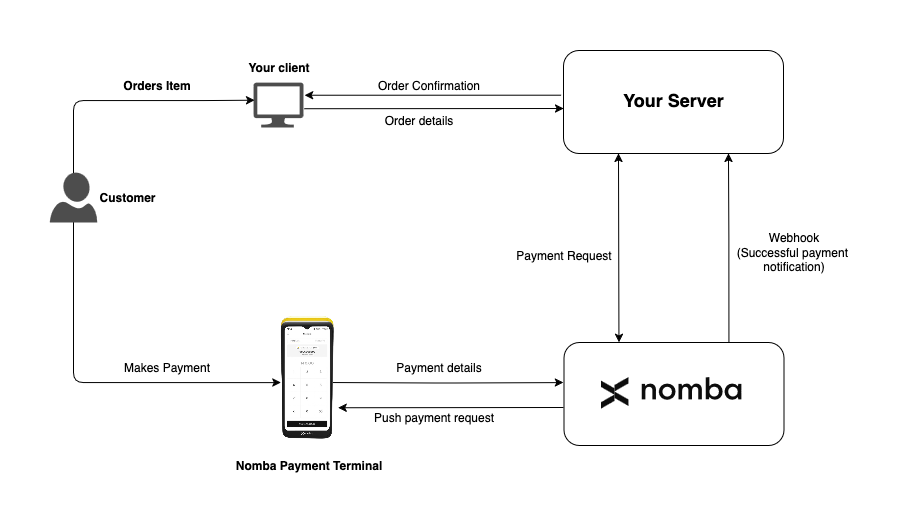 ### Flow Description
1. **Customer Orders an Item**\
The customer initiates a purchase through your client application.
2. **Client Sends Order to Server**\
Your frontend sends the order details (including `orderId`, `amount`, and `currency`) to your backend.
3. **Server Sends Payment Request to Nomba**\
Your backend uses the `POST /v1/terminals/payment-request/{terminalId}` endpoint to trigger a payment on the specific terminal.
#### Endpoint: `POST /v1/terminals/payment-request/{terminalId}`
**Request Body Schema**: `TerminalPaymentRequest`
```json theme={null}
{
"merchantTxRef": "55555555",
"amount": 1000,
"currency": "NGN"
}
```
4. **Nomba Pushes Payment to Terminal**\
The terminal receives a payment prompt and displays the amount to the customer.
5. **Customer Makes Payment on Terminal**\
The customer completes the payment using a supported payment method.
6. **Nomba Sends Webhook to Your Server**\
Upon successful payment, Nomba sends a webhook to your server with the payment confirmation and metadata.
## Webhook Notification
Your server must be able to receive webhook notifications from Nomba. Ensure your webhook endpoint is secured and reliable.
***
### Flow Description
1. **Customer Orders an Item**\
The customer initiates a purchase through your client application.
2. **Client Sends Order to Server**\
Your frontend sends the order details (including `orderId`, `amount`, and `currency`) to your backend.
3. **Server Sends Payment Request to Nomba**\
Your backend uses the `POST /v1/terminals/payment-request/{terminalId}` endpoint to trigger a payment on the specific terminal.
#### Endpoint: `POST /v1/terminals/payment-request/{terminalId}`
**Request Body Schema**: `TerminalPaymentRequest`
```json theme={null}
{
"merchantTxRef": "55555555",
"amount": 1000,
"currency": "NGN"
}
```
4. **Nomba Pushes Payment to Terminal**\
The terminal receives a payment prompt and displays the amount to the customer.
5. **Customer Makes Payment on Terminal**\
The customer completes the payment using a supported payment method.
6. **Nomba Sends Webhook to Your Server**\
Upon successful payment, Nomba sends a webhook to your server with the payment confirmation and metadata.
## Webhook Notification
Your server must be able to receive webhook notifications from Nomba. Ensure your webhook endpoint is secured and reliable.
***