

Push payment to terminal
POST /v1/terminals/payment-request/{terminalId}
Path parameters
string
required
The unique identifier of the terminal to send the payment request to.
Request body
string
required
The unique identifier for the order associated with the payment.
number
required
The total amount to be charged on the terminal, in the smallest currency unit (e.g., kobo).
string
required
Currency code based on the ISO4217 standard. Allowed values:
NGN, USD, CDF.Response body
string
required
Response code
string
required
Response description
object
How It Works
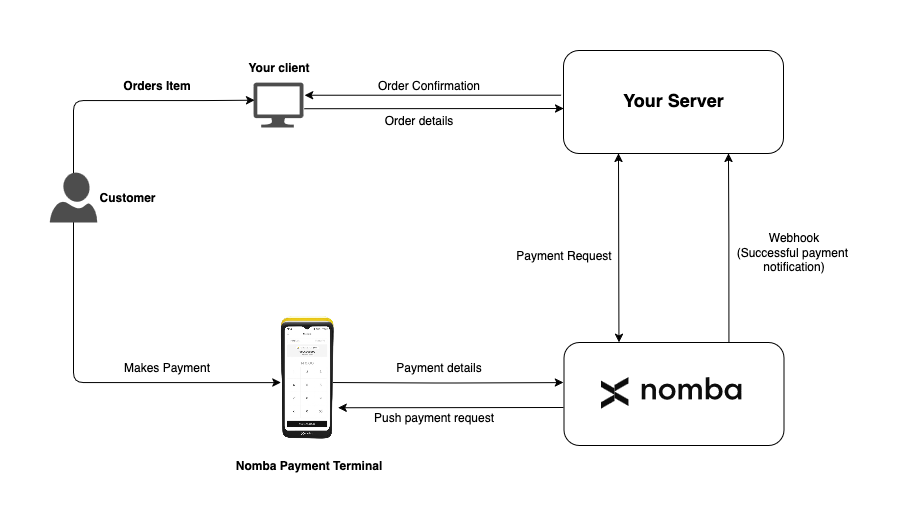
Push Payment to Terminal
Flow Description
- Customer Orders an Item The customer initiates a purchase through your client application.
-
Client Sends Order to Server
Your frontend sends the order details (including
orderId,amount, andcurrency) to your backend. -
Server Sends Payment Request to Nomba
Your backend uses the
POST /v1/terminals/payment-request/{terminalId}endpoint to trigger a payment on the specific terminal. - Nomba Pushes Payment to Terminal The terminal receives a payment prompt and displays the amount to the customer.
- Customer Makes Payment on Terminal The customer completes the payment using a supported payment method.
- Nomba Sends Webhook to Your Server Upon successful payment, Nomba sends a webhook to your server with the payment confirmation and metadata.